
Python
Graphviz 16, p5.js 1.11 and proj4js 2.22
Three JavaScript libraries on which Python modules of Basthon rely had not moved for several years. They take a big leap, without changing anything to existing programs.

Drawings, figures and windows in full screen
After the notebook in full screen, it is the turn of Basthon's graphical outputs: p5 drawings, interactive matplotlib figures and tkinter windows now have their own full screen button, in the console as in the notebook.
It appears at the top right when the mouse hovers over the drawing. A click enlarges it to the size of the screen, and it stays interactive: mouse, keyboard, animations. Leave it with the same button or the Esc key. Ideal to project a game or a simulation in class!
tkinter windows in Basthon
It was a recurring request: tkinter programs now work in Basthon. Windows, buttons, entry fields, canvases, animations, menus, ttk widgets, messagebox or simpledialog dialogs… everything is shown in the graphical view of the console or below the cell of a notebook, and reacts to the mouse and the keyboard.
import tkinter as tk

window = tk.Tk()
window.title("Counter")
value = tk.IntVar(window, 0)

tk.Label(window, textvariable=value, font=("Arial", 32)).pack(padx=40, pady=10)
tk.Button(window, text="+ 1",
          command=lambda: value.set(value.get() + 1)).pack(pady=10)

window.mainloop()
There is nothing to install nor to change in the code: import tkinter is enough. The only difference with a computer: mainloop() returns at once. The window stays alive (clicks, keyboard, animations with after) while the rest of the program or other cells run, which can read what was typed in the window. Dialogs, however, do wait for the user's answer, as on a computer.
The gallery gets a few examples, from the simplest to the most complete: a counter, a small drawing program, a brick breaker, and a notebook that gathers a counter, a form with its dialogs, and a snake game.
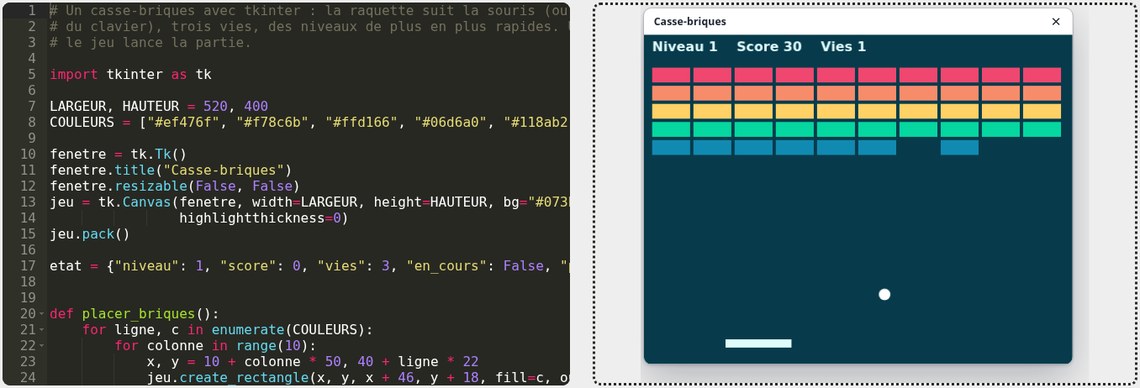
The notebook of examples:
Under the hood
The browser has no Tk: tkinter relies here on tkinter-web-backend, a Tk engine written in Python for Basthon. It computes the windows (pack, grid and place layouts, fonts, canvas items…) like the real Tk, and the page just draws them. It is free software, published on PyPI, which is also useful outside Basthon: python -m tkinter_web program.py shows the windows of a tkinter program in a tab of the browser.
To use the keyboard in a window, click in it first. And to animate, after is the right way (rather than a loop with sleep): the window stays responsive.
Basthon on the command line
Basthon leaves the browser: the basthon command runs its kernels in a terminal, with Node.js (version 20.15 or later). It is installed with npm:
npm install -g @basthon/kernel-nodeIt is used like the python command: basthon program.py runs a file, basthon -c "print(6 * 7)" a statement, and basthon alone opens an interactive console, with completion and input(). It is exactly Basthon's Python, with its modules, and it reads and writes the files of the computer directly.
Express restarts for Python
Restarting Basthon's Python kernel is now almost instant: about half a second, against three seconds before. You can start again from a clean state as often as needed, without waiting, in the console as in the notebook.
To achieve it, Basthon takes a snapshot of Python's memory just after it is loaded, before running a single line of code. At each restart, it starts again from this snapshot instead of reloading everything. Nothing of your code or your variables is in it: the kernel really restarts afresh.
The browser also keeps this snapshot from one visit to the next. From the second visit on, the kernel is ready in less than a second, instead of two and a half.
These speed-ups concern the isolated kernels, used by default. The legacy mode starts as before.