
Pillow images in tkinter
Basthon's tkinter windows now show Pillow images, as on a computer: ImageTk.PhotoImage turns a Pillow image (or a file) into a tkinter image, to put in a Label, a Button or a Canvas. Its paste method replaces the image shown: ideal to see the effect of an image processing click after click.
python
import tkinter as tk
from PIL import Image, ImageDraw, ImageFilter, ImageOps, ImageTk

# an image made with Pillow: a gradient and disks
image = Image.new("RGB", (300, 200))
draw = ImageDraw.Draw(image)
for x in range(300):
    draw.line([(x, 0), (x, 199)], fill=(x * 255 // 300, 120, 255 - x * 255 // 300))
for x, y, colour in [(80, 100, "gold"), (150, 70, "white"), (220, 120, "crimson")]:
    draw.ellipse([x - 40, y - 40, x + 40, y + 40], fill=colour, outline="black", width=3)

window = tk.Tk()
window.title("Pillow filters")
photo = ImageTk.PhotoImage(image)
tk.Label(window, image=photo).pack()

def apply(filter_):
    global image
    image = filter_(image)
    photo.paste(image)

buttons = tk.Frame(window)
buttons.pack(pady=5)
for text, filter_ in [
    ("Blur", lambda im: im.filter(ImageFilter.GaussianBlur(3))),
    ("Edges", lambda im: im.filter(ImageFilter.FIND_EDGES)),
    ("Grey", lambda im: ImageOps.grayscale(im).convert("RGB")),
    ("Mirror", ImageOps.mirror),
    ("Negative", ImageOps.invert),
]:
    tk.Button(buttons, text=text, command=lambda f=filter_: apply(f)).pack(side="left")

window.mainloop()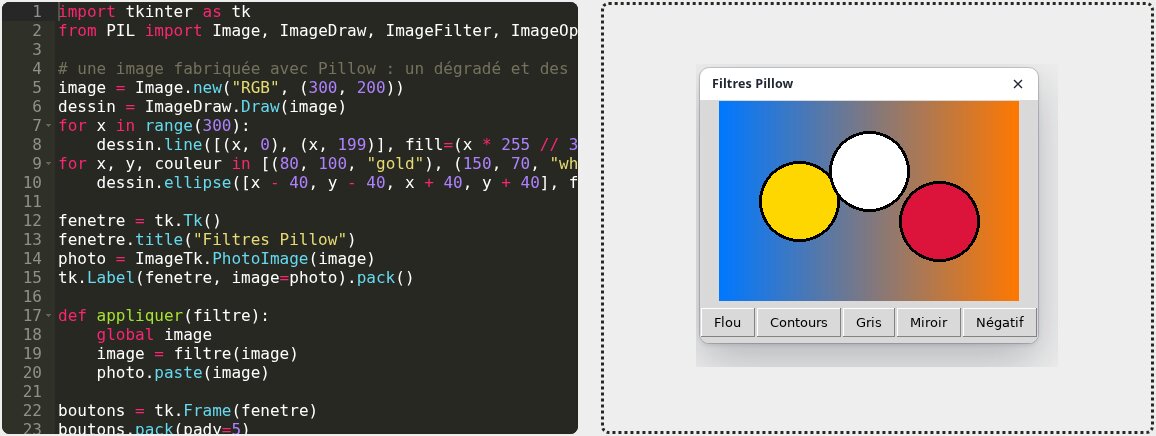
The image can also come from a file opened in Basthon, a photo for instance: Image.open("photo.jpg") instead of the image made.